Email marketing for small business works best when you treat it as a system rather than an occasional blast: a steady way to collect subscribers, a few automated emails that run on their own, and a regular send people expect. Most guides on the subject come from the platforms selling you a subscription. This one is a neutral 30-day plan that works with any tool.
Table of Contents
Is email marketing for small business still worth it?
Yes, for most businesses that sell to the same customers more than once. Social reach depends on an algorithm you do not control, and paid ads stop working the day the budget runs out. An email list is an audience you own. If a platform changes its rules tomorrow, your subscribers are still in your account and you can export them.
Email is also cheap to run. Most platforms have a free or low-cost tier for small lists, and the main cost is your time. Because people chose to hear from you, each email reaches someone who already knows your name. That makes it the natural follow-up step in any sales funnel, connecting a first visit to a first purchase.
It is not a fit for everyone. A business that sells a one-off product with no repeat purchase, such as a once-in-a-lifetime service, gets less from a newsletter. Even then, referral and review requests by email usually pay off. Overall, email marketing for small business still earns its place because it compounds: every subscriber you add today can still be on the list in three years.
What email does well, and what it does not
- Good at: repeat sales, announcing new products, onboarding new customers, winning back lapsed buyers, collecting reviews.
- Weak at: reaching strangers. Email grows an existing relationship; it rarely creates one from scratch.
- Not a substitute for: a working website and a clear offer. Email amplifies what already converts.
A quick test: if at least some of your revenue comes from people who have bought before, or if customers usually think for days or weeks before buying, a list will pay for the time you put into it.
How to start email marketing with no list
Every list starts at zero, and the first rule is simple: never buy one. Purchased addresses did not agree to hear from you, they complain and bounce, and that damage to your sender reputation follows you for months. Build a permission-based list instead, even if it grows slowly.
Start with people who already know you
Your first subscribers usually come from existing relationships: past customers, people who emailed you with questions, event contacts. Ask them directly, one by one or in a single personal note, whether they would like to get your updates. A yes from someone who already bought from you is worth more than a hundred strangers.
Offer a lead magnet worth the address
A lead magnet is a small, useful thing someone gets in return for subscribing. It should solve one specific problem your buyers have, fast. Good small-business examples:
- A one-page checklist (“Spring lawn care in 6 steps” for a landscaper)
- A price guide or cost calculator that answers the question everyone asks before buying
- A first-order discount or free delivery code for a shop
- A short template pack, such as invoices for freelancers or meal plans for a nutritionist
- Early access to a seasonal sale or a waitlist for a new service
Put signup points where people already are
- A form in your website footer and on your most-visited blog posts
- A dedicated landing page you can link from social bios
- The checkout page, with an unticked box for marketing consent
- A QR code at the counter, on receipts or on packaging
- A signup sheet or tablet at markets, workshops and events
Keep the form short: an email address and perhaps a first name. Every extra field lowers signups. If you market to people in the EU or UK, add a clear consent statement, because those rules generally require opt-in consent for marketing email to individuals.
A 30-day launch plan
You do not need a quarter-long project to get started. The plan below spreads setup over four weeks so it fits around running a business. Pick a reputable email service provider first; most offer similar core features, so choose on ease of use, price at your expected list size and the quality of the automation builder.
| Week | Focus | Concrete tasks | Done when |
|---|---|---|---|
| 1 | Foundations | Choose a platform, verify your sending domain, set up SPF, DKIM and DMARC, import existing customers who gave consent | A test email lands in the inbox at Gmail and Outlook |
| 2 | List building | Create one lead magnet, build a landing page and site forms, add checkout opt-in | Forms work and the lead magnet is delivered automatically |
| 3 | Automations | Write and switch on the welcome sequence and post-purchase email | A test signup receives every email in the right order |
| 4 | First campaign | Send your first newsletter, then review results after 48 hours | Campaign sent, metrics recorded in a simple sheet |
After day 30, the work becomes routine: one regular campaign on a fixed schedule, a monthly look at the numbers, and one new automation each quarter. That rhythm is what turns email marketing for small business from a side project into a dependable channel.
What to look for in a platform
- Pricing by list size, with a clear idea of what you will pay at two or three times your current list
- A visual automation builder that handles welcome, post-purchase and win-back flows
- Built-in signup forms and landing pages, so you do not need extra tools
- Integration with your shop, booking system or CRM, so purchases can trigger emails
- Easy export of your contacts, in case you ever switch
Use a business address on your own domain
Send from something like hello@yourbusiness.com, not a free Gmail or Yahoo address. Large mailbox providers publish DMARC policies for their own domains, and Gmail’s bulk-sender rules expect a From address on a domain you authenticate. Campaigns sent “from” a free address through a marketing platform are therefore likely to be filtered or rejected.
The 4 emails to automate first
Automations are emails triggered by what a person does, not by a calendar. They are written once and keep working. If you only have time for a handful, these four cover the moments that matter most.
- Welcome sequence (2-4 emails). Triggered by signup. Deliver the lead magnet immediately, introduce who you are, set expectations about how often you write, and end with a clear next step such as a starter product or booking link.
- Post-purchase follow-up. Triggered by an order. Thank the customer, explain how to get the most from what they bought, and a week or two later ask for a review.
- Abandoned cart or inquiry follow-up. Triggered when someone starts checkout or requests a quote but does not finish. One or two reminders within a few days, with an answer to the most common objection.
- Win-back email. Triggered when a customer has not bought or opened in a set period (often 90-180 days, depending on your buying cycle). Ask what changed, offer something useful, and remove them if they stay silent.
The post-purchase and win-back emails do most of the heavy lifting for repeat revenue, and they pair well with the wider customer retention strategies you use offline, such as loyalty cards or personal check-ins.
Why start with these four?
Each one fires when interest is highest: right after signup, right after purchase, right after hesitation, and just before a customer drifts away for good. Scheduled newsletters rarely hit those moments. Write them in plain language, keep each email focused on a single action, and review them every six months so offers and links stay current.
A simple welcome sequence you can copy
| When it sends | Main job | |
|---|---|---|
| 1 | Immediately after signup | Deliver the lead magnet and say what to expect |
| 2 | Day 2 or 3 | Tell your story and why customers choose you |
| 3 | Day 5 to 7 | Answer the most common buying question |
| 4 (optional) | Day 8 to 10 | Make a clear first offer or invite a booking |
How often should you send?
There is no universal number. The right frequency is the one you can keep up consistently with something worth reading every time. For most small businesses that means somewhere between twice a month and once a week for regular campaigns, plus automations running in the background.
| Business type | Typical starting cadence | Why |
|---|---|---|
| Online shop with frequent new stock | Weekly | Regular product news gives a natural reason to send |
| Local service (salon, trades, clinic) | Every 2-4 weeks | Seasonal reminders and booking openings matter more than volume |
| B2B consultancy or agency | Every 2 weeks or monthly | Readers want depth, not frequency |
| Restaurant or cafe | Weekly or event-based | Menus, specials and events change often |
Start lower than you think, then increase only if unsubscribe and spam complaint rates stay low. Tell new subscribers in the welcome email how often you will write, and stick to it. A predictable schedule earns more trust than a burst of five emails followed by three months of silence.
What to put in a regular newsletter
- One genuinely useful tip or answer to a question customers keep asking
- One piece of news: a new product, service, date or price change
- One clear call to action, such as booking, buying or replying
- Optional: a short customer story, review or behind-the-scenes note
Marketing to people who asked to hear from you is a different discipline from prospecting strangers. If you also do outreach, keep it separate from your newsletter list and follow the practices in our cold email tips, usually from a different sending domain or subdomain.
Keeping emails out of spam: SPF, DKIM and DMARC
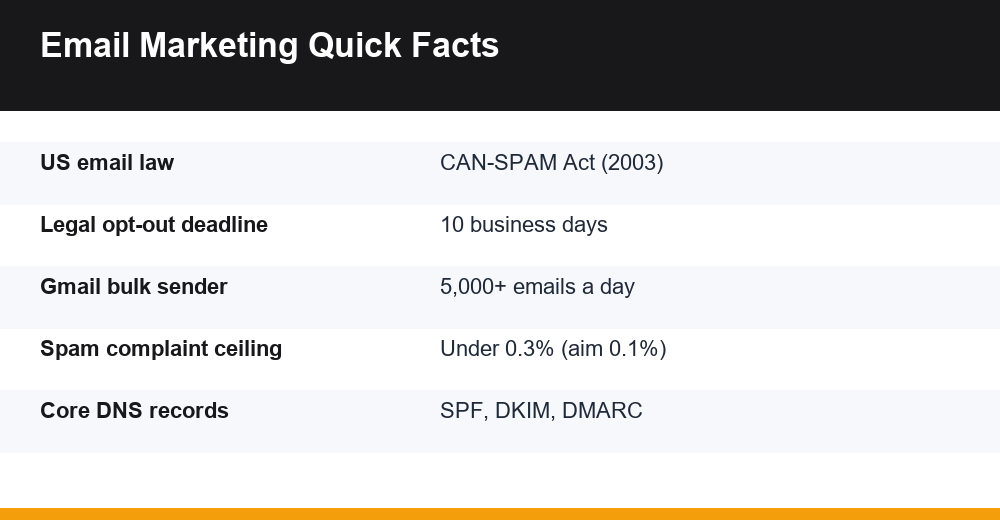
Since February 2024, Gmail and Yahoo have enforced stricter rules for anyone sending in volume, and Microsoft began applying similar requirements to high-volume senders reaching Outlook.com, Hotmail and Live addresses in May 2025. Gmail defines a bulk sender as one sending around 5,000 or more messages a day to personal Gmail accounts. Even if you send far fewer, following the same rules is the easiest way to reach the inbox.
The three DNS records, in plain English
- SPF (Sender Policy Framework): a DNS record listing which servers may send email for your domain. Your email platform tells you what to add.
- DKIM (DomainKeys Identified Mail): a digital signature added to each email that proves it was not altered and really came from your domain.
- DMARC: a policy telling inbox providers what to do when a message fails SPF or DKIM checks, and where to send reports. Starting with a monitoring policy (p=none) is common, then tightening it once reports look clean.
Your provider’s setup wizard usually gives you the exact values to paste into your domain’s DNS settings. It often takes under an hour, though DNS changes can take up to a day or two to take effect everywhere.
Habits that protect your sender reputation
- Keep spam complaints below 0.3%, ideally near 0.1%. Google Postmaster Tools shows your rate for Gmail.
- Include a visible unsubscribe link plus one-click unsubscribe in the email header (most platforms add this automatically) and process requests promptly.
- Remove hard bounces immediately and stop mailing people who have not engaged in many months.
- Use double opt-in if your signup forms attract fake or mistyped addresses.
- Avoid misleading subject lines; they raise complaints and break the law.
The legal minimum in the US
The CAN-SPAM Act applies to all commercial email, and it makes no exception for business-to-business messages. The FTC’s CAN-SPAM compliance guide for business sets out the essentials: accurate header and sender information, honest subject lines, identifying the message as an ad, a valid physical postal address, and a working opt-out honored within 10 business days.
Penalties are steep: the FTC lists up to $53,088 for each separate violating email. Hiring a platform or agency does not move your legal responsibility onto them, so check what goes out under your name.
Good open and click rates, and what to track instead
Published benchmarks vary widely because each platform measures a different mix of customers and counts opens differently. Recent platform reports put average open rates anywhere from roughly 20% to more than 40%, with click rates commonly around 1-3%. Treat any single figure as approximate, and compare like with like.
Open rates have also become unreliable. Apple Mail Privacy Protection loads emails automatically, which counts many unread messages as opened. That is why the most useful numbers in email marketing for small business are the ones tied to actions people actually take.
| Metric | What it tells you | Rough healthy range (approximate) |
|---|---|---|
| Click rate | Whether content and offers interest readers | About 1-3% of delivered emails |
| Conversion / revenue per email | Whether email produces sales or bookings | Compare against your own past campaigns |
| Unsubscribe rate | Whether frequency and relevance fit | Usually well under 0.5% per send |
| Spam complaint rate | Deliverability risk | Below 0.1%; never above 0.3% |
| Bounce rate | List quality | Under 2%; investigate anything higher |
| List growth | Whether signup points work | Net new subscribers each month |
A 15-minute monthly review
- Note list size, new subscribers and unsubscribes for the month.
- Record clicks and any sales or bookings each campaign produced.
- Check the spam complaint rate and bounces for warning signs.
- Pick the best-performing email and ask why it worked.
- Change one thing next month, such as subject line style or send day.
Your own trend line matters more than any industry average: a click rate rising from 1.2% to 2% over six months tells you more than knowing a benchmark.
Common mistakes in email marketing for small business
Most problems come from a handful of habits, and each has a simple fix.
- Selling in every email. Mix offers with genuinely useful content, such as tips, answers to customer questions or behind-the-scenes updates.
- Designing for desktop only. Many people read on phones; use a single-column layout, short paragraphs and large buttons.
- Sending everyone the same message. Even basic segments, such as customers versus prospects, make emails more relevant.
- Ignoring the welcome email. It is typically one of the most-read emails you will ever send. Make it count.
- Never cleaning the list. Inactive addresses drag down engagement and deliverability.
- Changing tools every few months. Pick a platform, learn it and give it a year.
The businesses that do well with email are rarely the ones with the cleverest templates. They are the ones that kept sending something useful, month after month, and paid attention to what their readers clicked. Follow the 30-day plan, switch on the four automations, and let the list compound.
Frequently Asked Questions
Is email marketing still worth it for small businesses?
Yes, for most businesses with repeat customers. You own your subscriber list, so changes to social media algorithms or ad prices do not cut you off from your audience. Costs are low, mostly your time and a platform fee that scales with list size. Email works best for repeat sales, reviews and win-backs rather than reaching complete strangers.
How do I start email marketing with no list?
Start by personally inviting past customers and contacts who already know you. Then create one lead magnet, such as a checklist, price guide or first-order discount, and place signup forms on your website, checkout page, social bios and at your counter or events. Never buy a list, because purchased addresses cause complaints and damage your sender reputation.
What emails should be automated first?
Automate four emails first: a welcome sequence triggered by signup, a post-purchase follow-up with a review request, an abandoned cart or unanswered quote reminder, and a win-back email for customers who have gone quiet. Each one fires when interest is highest, keeps working after you write it once, and usually outperforms scheduled newsletters.
How do I keep my emails out of the spam folder?
Send from your own domain and set up SPF, DKIM and DMARC records in your DNS. Include a visible unsubscribe link and one-click unsubscribe, remove bounced addresses, and stop emailing people who never engage. Keep spam complaints below 0.3%, ideally around 0.1%, and avoid misleading subject lines, which also break US law.